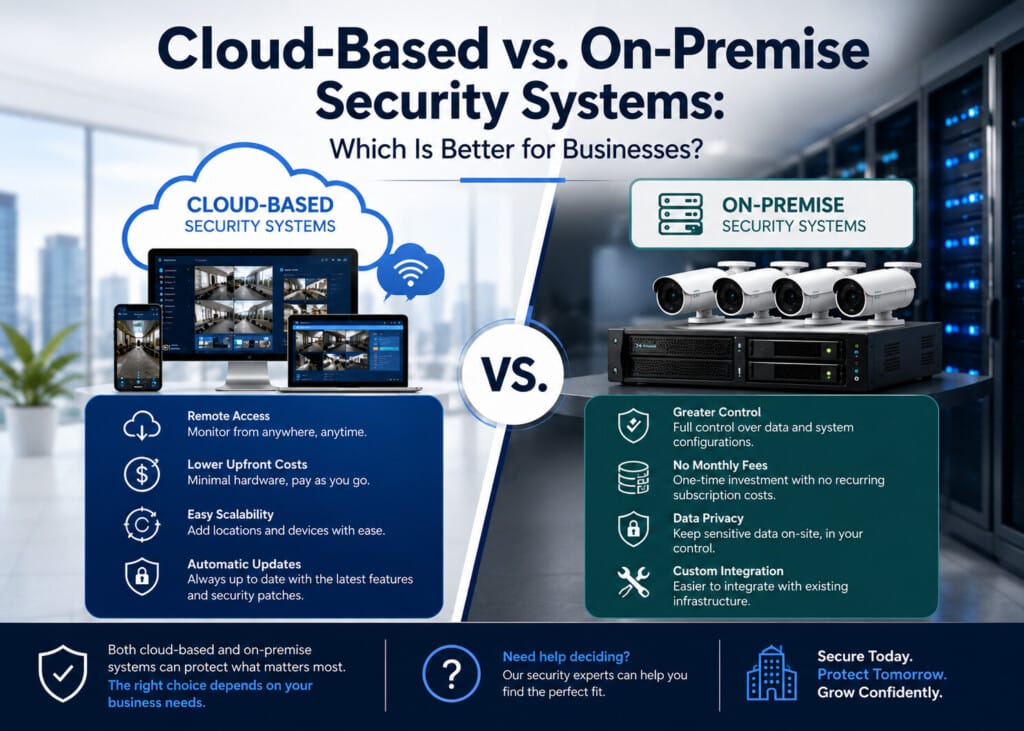
A business security system should protect people, property, and valuable information without creating unnecessary challenges. Cloud-based vs on-premise security systems is a common comparison because both options offer reliable protection, but each has different strengths.
Cloud systems provide remote access and simple updates, while on-premises systems keep data stored within the business. The better choice depends on building size, security goals, budget, and how the system will be managed over time.
Understanding Cloud-Based Security Systems
A cloud-based security system stores video recordings, access data, and system information on secure remote servers instead of local equipment. Authorized users can view cameras, receive alerts, and manage security settings from a computer, tablet, or mobile phone with an internet connection.
Cloud systems are popular because they are easy to manage across one or multiple locations. Software updates are handled automatically, reducing the need for manual system updates.
Businesses with multiple offices can monitor all locations through a single platform.
Another advantage is flexibility. As a business grows, new cameras, access control devices, or security features can be added without replacing the entire system.
Understanding On-Site Security Systems
On-premise security systems store video recordings and security data on equipment inside the building instead of using cloud storage. This option gives businesses more control over their information and allows the system to continue recording locally, even if the internet connection is temporarily unavailable.
Comparing Both Security Solutions
Both systems provide dependable protection, but they differ in several important areas. Understanding these differences makes it easier to choose the right solution for a commercial property.
| Feature | Cloud-Based Security Systems | On-Premise Security Systems |
| Data Storage | Remote cloud servers | Local servers or recorders |
| Remote Access | Available from almost anywhere | May require secure network access |
| Software Updates | Automatic | Manual or scheduled |
| Initial Cost | Lower equipment investment | Higher upfront investment |
| Scalability | Easy to expand | Expansion may require additional hardware |
| Data Control | Managed through cloud platform | Managed within the facility |
Neither option is better for every business. The right choice depends on operational needs and long-term security goals.
Factors Businesses Should Compare
Every business has different security priorities. Looking at several key areas before making a decision can prevent unnecessary costs and future upgrades.
Important factors include:
- Building size and number of locations
- Available budget
- Data security requirements
- Internet reliability
- Future business growth
- Remote access needs
- Internal IT resources
Reviewing these factors helps businesses select a system that supports daily operations while providing dependable protection.
Choosing the Right Solution for Different Business Types
Small offices may benefit from cloud-based systems because they are simple to manage and can be accessed from almost anywhere. Business owners who travel frequently also appreciate the ability to monitor their property remotely.
Larger facilities, manufacturing plants, healthcare buildings, and organizations with strict data policies may choose local storage for greater control over security information. Their security requirements may also involve more complex network management.
Some organizations even combine cloud and local storage to create a hybrid solution. This approach provides remote access while keeping important data stored inside the facility.
Security Is More than Cameras
A complete security system includes more than surveillance cameras. Access control, intrusion detection, alarm monitoring, and visitor management all work together to improve building security.
Modern Commercial security solutions allow these technologies to communicate through one platform. Security teams can monitor activity, manage user access, receive alerts, and review recorded events more efficiently than using separate systems.
Planning for Future Business Growth
A security system should support future business needs, not just current requirements. Business operations can change over time with new employees, additional buildings, or expanded workspaces. Choosing a system that can grow with the business reduces the need for major upgrades later.
Cloud-based systems are known for simple expansion. New devices can be added with minimal changes to the existing setup. Local systems can also be expanded, but they may require additional storage, hardware, or network equipment.
Planning saves time and supports long-term value. A security system should continue meeting business needs as operations grow.
Common Mistakes to Avoid
Choosing a security system without careful planning can lead to unnecessary costs and limited performance. Looking beyond the initial price helps businesses make a better long-term decision.
Some common mistakes include:
- Choosing a system based only on cost
- Ignoring future business growth
- Overlooking data storage requirements
- Not considering remote access needs
- Selecting equipment that cannot be expanded
- Failing to review cybersecurity features
Taking time to compare available options helps businesses invest in a solution that fits both current and future security needs.
Why Professional System Design Matters?
Every commercial property has different security challenges. An office building, warehouse, school, healthcare facility, or retail store requires a different security approach. A system designed for one building may not provide the same level of protection in another.
Professional planning considers building layout, entry points, restricted areas, parking lots, and daily operations. Camera placement, access control devices, and alarm systems should work together to provide complete coverage.
A well-planned system also improves daily management. Security staff can respond to alerts faster, monitor important areas more effectively, and reduce blind spots across the property.
Making the Right Decision
There is no single security solution that works for every business. The best choice depends on how the building operates, where security data should be stored, and how the system will be managed over time.
Businesses looking for simple remote access and easy expansion may find cloud-based systems a better fit. Organizations with strict internal data policies may prefer local storage and direct control over system information.
Comparing features, long-term costs, and business goals makes the decision easier. A carefully selected system provides reliable protection today while supporting future growth.
Frequently Asked Questions
Which security system is better for a small business?
Cloud-based security systems are a good choice for many small businesses because they provide remote access, simple management, and easy expansion without requiring large amounts of on-site equipment.
Can on-premises security systems work without the internet?
Yes. Local systems can continue recording and storing data on site even if the internet connection is temporarily unavailable. Remote access features may be limited during the outage.
Are cloud-based security systems secure?
Yes. Reputable cloud security platforms use encryption, secure data centers, and user authentication to protect information. Security also depends on proper system setup and access management.
What should businesses consider before choosing a security system?
Important factors include building size, number of locations, available budget, data storage preferences, remote access needs, future expansion plans, and internal security requirements.
Can a security system include more than surveillance cameras?
Yes. Modern security systems can combine video surveillance, access control, intrusion detection, alarm monitoring, intercoms, and visitor management into one integrated solution.
Final Thoughts
Understanding Cloud-based vs. on-premises security systems helps businesses choose a security solution that matches their daily operations and long-term goals. Both options provide strong protection, but each offers different advantages.
Comparing storage, access, scalability, and security needs allows businesses to invest in a system that delivers reliable performance for years to come.
Build a Smarter Security System for Your Business
Choosing the right security solution starts with expert guidance. At GlobalTech Group, we design and install integrated commercial security systems tailored to each facility. We work closely with our clients to deliver reliable solutions that improve security, simplify daily management, and support long-term business goals.